Music sounds fine through your wireless headphones, then you join a voice chat and everything becomes flatter, almost like a telephone call. That change does not necessarily mean the headset is faulty. The computer may switch the Bluetooth connection into a different operating mode as soon as an application starts using the headset’s microphone.
Microsoft is extending the options for avoiding that compromise on compatible hardware. Its November 20 Windows 11 preview announcement introduced two-channel, 16-bit, 48kHz playback while a Bluetooth LE Audio device’s microphone is active. The feature belongs to the Experimental channel. It is not a general update that every Windows 11 computer can use today.
Why opening voice chat can change a game’s sound
Listening and talking at the same time place different demands on a wireless connection. Playback sends sound to the headphones; using their microphone also requires a return path for your voice. That transition can alter the formats available for listening.
Microsoft’s documentation on communications audio formats explains that Bluetooth Classic uses the Hands-Free Profile for these scenarios, with both recording and playback operating in mono. In that mode, a Classic Bluetooth headset cannot provide stereo playback while its microphone is being used.
For a player, the effect can extend beyond a change in tone. Stereo sends different signals to the left and right ears, helping convey the position of sounds. Collapsing that information into mono changes the listening experience. The game’s own audio design and settings still determine how useful those cues are; a Windows option cannot promise better competitive results.
Work can present a similar problem in a less dramatic setting. Imagine discussing a video with a colleague while listening to the same material locally. If opening the call changes how it sounds, judging the audio becomes less straightforward. The useful improvement is consistency: being able to speak and listen without repeatedly changing devices.
What is actually new about 48kHz
Some compatible Windows systems already support stereo playback while the microphone is active, as described in Microsoft’s Bluetooth LE Audio quality settings guide. The latest announcement should therefore not be read as the first arrival of stereo-plus-microphone support on Windows.
The extension is full-range stereo playback at 48kHz. That number is a sampling rate, rather than a connection speed or a volume level. Two channels means stereo. Together, the values describe the playback format offered while the microphone is working.
They do not promise lossless wireless transmission, describe the quality of the headphone drivers or guarantee that another person hears your voice at the same sampling rate. This control appears under output settings. Microphone recording quality, the calling application’s voice processing and connection latency are separate parts of the experience.
The hardware requirements matter
Running Windows 11 is only one part of the picture. Microsoft specifies a PC that supports Super Wideband Stereo and a Bluetooth LE Audio device capable of 48kHz playback. Appropriate drivers and access to the experimental feature also matter.
A prominent Bluetooth version number on the packaging is not a sufficient compatibility check. Microsoft’s guide to checking LE Audio support distinguishes Bluetooth Low Energy support from LE Audio support. The necessary capabilities must exist on both sides of the connection.
A starting point is Settings → Bluetooth & devices → Devices, where compatible systems expose Use LE Audio when available. Finding that switch does not by itself establish support for the new 48kHz mode. The next checks are the specifications of the particular PC and headphones, together with the manufacturer’s driver information.
This distinction is also useful when shopping. “Works with Windows” may describe ordinary connectivity without saying anything about simultaneous stereo playback and microphone use. Look for confirmation of the feature you need for the relevant hardware combination, rather than assuming any newer adapter will supply it.
Where to find the new setting
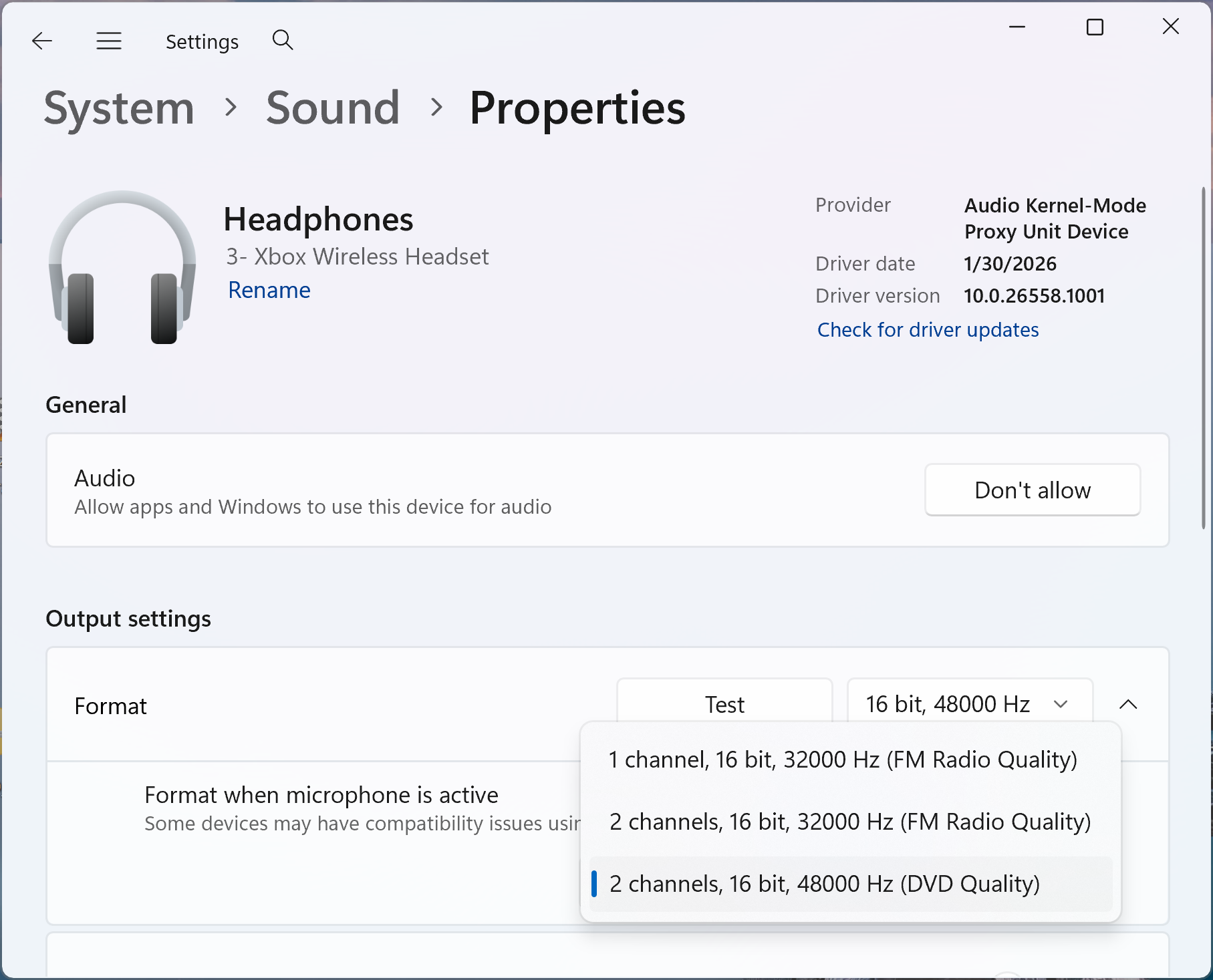
On a compatible preview system, connect the LE Audio device and follow these steps:
Open Settings → System → Sound.
Choose the Bluetooth device under Output.
Open Output settings and expand the format controls.
Under Format when microphone is active, select 2 channels, 16 bit, 48000 Hz, if offered.
The release notes for build 26340.10032 place the change among features being introduced gradually. Installing the relevant preview build does not guarantee that every participant immediately receives the control.
If it is absent, start with the release channel, hardware support and drivers. Randomly changing every audio setting is unlikely to clarify which requirement is missing. There is also little reason to rebuild a primary work computer around one experimental sound option.
How to judge whether it helps your setup
Use a familiar situation when evaluating the feature: a game with voice chat, or a call while other audio plays. Check which microphone the application is actually using. A laptop’s built-in microphone is a different configuration from the microphone in the headphones and does not demonstrate the latter working alongside stereo playback.
Compare familiar material at the same volume. Listen for the stereo image, interruptions and how comfortable a longer conversation feels. Reliability in an everyday session matters more than an attractive format label. If the new mode causes glitches, return to the previous format and report the problem through Feedback Hub.
As of November 22, the announcement provides no general-release date. For most users, this is a development to follow rather than an option to expect immediately. Its practical value will be in making one wireless headset handle conversation and enjoyable playback consistently across the applications people already use.