
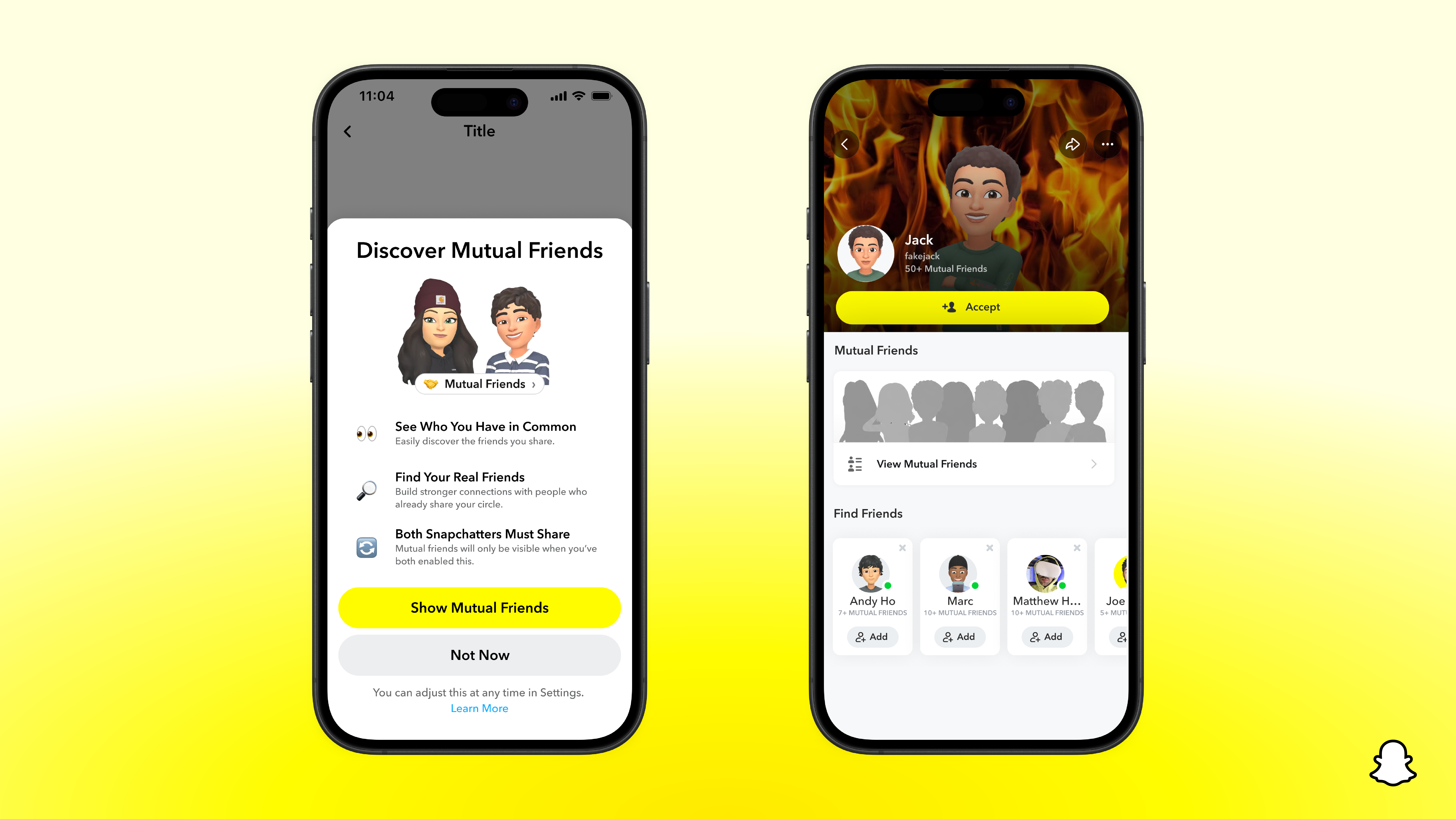
A friend request arrives. The name sounds familiar, but you cannot quite place it. Did you meet at a party, work on a project together, or is this someone else with the same name? Snapchat now offers another clue: a way to see people you both have as friends.
Snap introduced Mutual Friends on November 17. The optional profile feature starts switched off. At launch it is available on iOS and Android in the United States, Australia, France and Sweden. That is a regional release, so a missing option elsewhere does not necessarily mean anything is wrong with the app.
What a familiar name can add
Imagine trying to find someone after an evening with a large group. A name and avatar may not be enough to identify the right account. Seeing the person who organised the gathering among your shared friends can provide context: there is a plausible connection to the person you remember meeting.
This kind of clue can be useful where social circles overlap, including classes, workplaces, local communities and sports groups. Nobody has to remember every name after one conversation. Recognising a shared connection can make it easier to ask the right question or check that the profile belongs to the intended person.
The list does not measure the strength of a relationship, though. Two people may have added each other a long time ago without speaking regularly. A familiar name offers context; it does not establish that the account owner is a close friend of your friends or someone you should automatically trust.
There is a difference between making a decision easier and making it for you. The practical benefit is reducing uncertainty about where you might know someone from. Whether you want to reconnect, exchange messages or keep your circle small remains a separate choice.
Why switching it on yourself is not enough
Snapchat’s Mutual Friends support guide says both people must enable sharing. Individual shared friends may also be missing because they have not enabled the feature themselves. An empty or incomplete list therefore cannot establish that no shared connections exist.
Consider three people. You know Mark, Mark knows Anna, and you want to see that connection on Anna’s profile. Your wish to view the list is only one part of the situation. The settings chosen by the other people involved matter as well.
That makes the interpretation important. A missing name is not proof of an unfriending, an argument or a previously unknown separation between social circles. The interface is displaying the connections available for it to show, rather than presenting a complete history of who knows whom.
Treating the feature as a relationship audit would be a poor use of it. Someone can prefer a quieter profile without making a statement about any particular friend. Respecting that choice also makes the feature less awkward to discuss when one person has enabled it and another has not.
How to turn the setting on or off
The support instructions give the following route; wording may vary with the app’s language:
Open Settings.
Find Privacy Controls → Mutual Friends.
Enable Show Mutual Friends.
Open another person’s profile and select the shared-friends section, if available.
To stop sharing, switch the same control off. Public Profile owners can also manage it through profile editing. The feature is intended to provide context before a new connection, so there is no reason to add an unfamiliar account simply to begin checking who it belongs to.
Snap says enabling the feature and viewing a Mutual Friends list do not send notifications. Read that statement narrowly: it concerns those actions. It should not be extended into a promise that every action elsewhere in Snapchat is invisible to other people.
What to check when no list appears
Start with availability in your country and on your account, then check your own setting. Even if yours is enabled, the other person may not have agreed to sharing, and a shared friend may not have allowed their name to appear.
Keeping the app updated is sensible, but installing an update does not remove a regional restriction. Reopening the same profile cannot override another person’s preference either. If you want to understand the feature, try it with a friend who has access and is happy to compare settings, without pressuring anyone to make their connections visible.
If the immediate goal is simply to confirm someone’s account, asking through an established contact channel may be quicker. A social feature should make recognising people easier, rather than turning an ordinary introduction into an investigation.
Shared friends are separate from permission to contact you
Mutual Friends concerns the visibility of connections. Who can send messages or make calls is a different control. Snapchat’s Contact Me guidance distinguishes Friends from Friends and Contacts, with the latter also including people in the phone’s contacts.
It is worth making those decisions separately. You may want acquaintances to recognise you more easily while holding different preferences about direct messages. Enabling a discovery feature should not be treated as a complete answer to how you want communication to work.
Stories, location sharing and visibility in Find Friends also have their own controls, as Snapchat’s privacy settings overview explains. Reviewing them is a useful way to check whether older choices still match how you use the app today.
Who is likely to find it useful?
People who meet through existing groups have the clearest use case: after events, classes or shared activities, familiar names can make the first step less uncertain. For someone who uses Snapchat only with a small circle of close friends, additional visibility may offer little benefit.
Both approaches make sense. A new feature is an option, not an obligation, and leaving it disabled does not require an explanation to friends. Mutual Friends is most useful as a voluntary clue that helps someone recall the context of a connection while leaving the decision to communicate in their own hands.