
A useful thought is on your phone, meeting notes live in a document, and a helpful article has disappeared into messages you sent yourself. The information is technically saved, yet using it for a project means gathering it all again. Obsidian approaches that problem through connections: what belongs to a project, explains an idea or helps answer a question.
This is a practical overview rather than a new-release announcement. The benefit is easiest to understand through an ordinary situation: you record a lesson from a book, connect it to a work problem, and find both together a month later when you need to make a decision.
Your notes remain ordinary files
Obsidian’s data storage documentation explains that a vault is a folder on your device and text notes are Markdown files. Other text editors can open them. Ordinary local note-taking does not begin with a requirement to upload everything to a cloud service.
Markdown is not programming. It is text with simple markers for headings, lists and emphasis. You can begin with a paragraph and a few bullet points, learning more formatting only when it becomes useful. Giving a note a clear title usually matters more than mastering every available symbol.
This makes the main text portable, but does not mean every elaborate arrangement will look identical in another application. Special views, extensions and links may need adjustment. Keeping files locally also makes a backup plan important: local storage alone does not protect against losing the device.
Links preserve the reason you saved something
The internal-link guide describes the short double-bracket notation. Writing [[Project launch]] connects a passage to the corresponding note. One idea can therefore belong to several contexts without being copied into multiple folders.
Imagine taking notes during a client conversation. There is a budget question, a product requirement and an idea for the next meeting. You can keep the conversation together while linking it to the project and the relevant decisions. Returning later becomes an exercise in recovering context rather than merely searching for a phrase.
Not every word needs a link. A useful connection answers a practical question: why would I want to move from this note to that one? Without an answer, plain text may be clearer. A graph can provide an overview, but day-to-day value usually begins with a few well-chosen paths through the material.
Canvas helps when ideas need to sit side by side
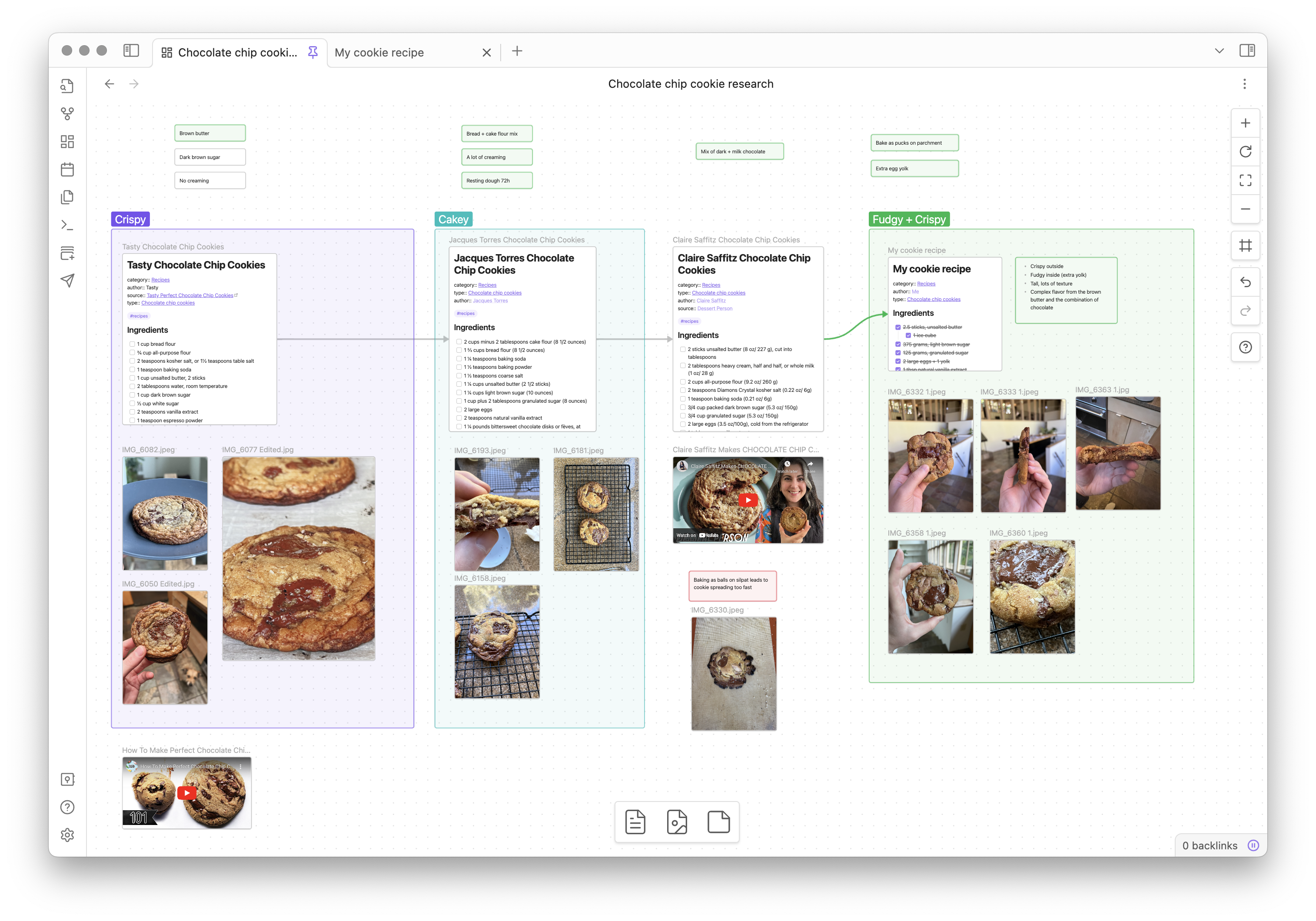
Obsidian Canvas provides a visual space for notes and supporting material. When planning an article, for example, you can place the central argument, evidence, questions and images alongside one another. Missing pieces may become easier to spot before you begin writing continuous prose.
The same approach can support study: a definition in one area, a worked example beside it and a common mistake below. The point is not to produce a beautiful diagram. It is to notice a relationship or a gap more quickly. If a straightforward list already works, there is no obligation to create a board.
Saving an article is only the first step
The official Web Clipper helps bring web material into a vault. Collecting pages automatically does not, however, turn them into useful knowledge. After saving something, add two sentences in your own words: what caught your attention and where you might use it.
One article with a concise takeaway and a connection to an active project can be more valuable than ten items saved for later. When you return, the note starts with meaning rather than another attempt to remember why it exists. Keep the original source and date, especially when the information may change.
A small review habit is also worth trying. At the end of a week, look at the material you captured and choose what actually deserves a place in ongoing work. Deleting an unhelpful clipping can be as productive as adding another one.
What is free, and what costs extra?
The current Obsidian pricing page confirms that the application is free to use, including for commercial work. A commercial licence is optional. Additional services, including syncing and publishing notes online, are paid separately.
Obsidian Sync offers cross-device syncing, end-to-end encryption and version history. It is an additional service rather than a prerequisite for taking notes on one computer. You can first find out whether the underlying workflow suits you, then decide how to use the same collection across a phone and laptop.
Syncing and backup have different purposes. Sync keeps working copies aligned; a backup provides a saved state to return to after an unwanted change. Important notes deserve consideration of both, rather than an assumption that seeing them on two screens guarantees recovery.
A manageable first week
Start with one vault and three purposes: incoming notes, active projects and reference material. This is a suggested starting arrangement, not an official required structure. Add one real project and a few useful sources, then see whether you can locate what you need several days later.
Choose extensions only when a particular problem makes them worthwhile. Obsidian’s plugin security guidance explains that community plugins can have broad access. The built-in tools are enough to begin; installing dozens of extras can make it harder to discover which parts of the workflow genuinely help.
Obsidian is especially relevant to people who revisit their writing: students, researchers, writers and anyone working on a long project. Someone who only needs a quick shopping list may gain little from the extra organisation. The useful measure is not the number of notes or the appearance of the graph. It is the moment an older note makes today’s work easier.