
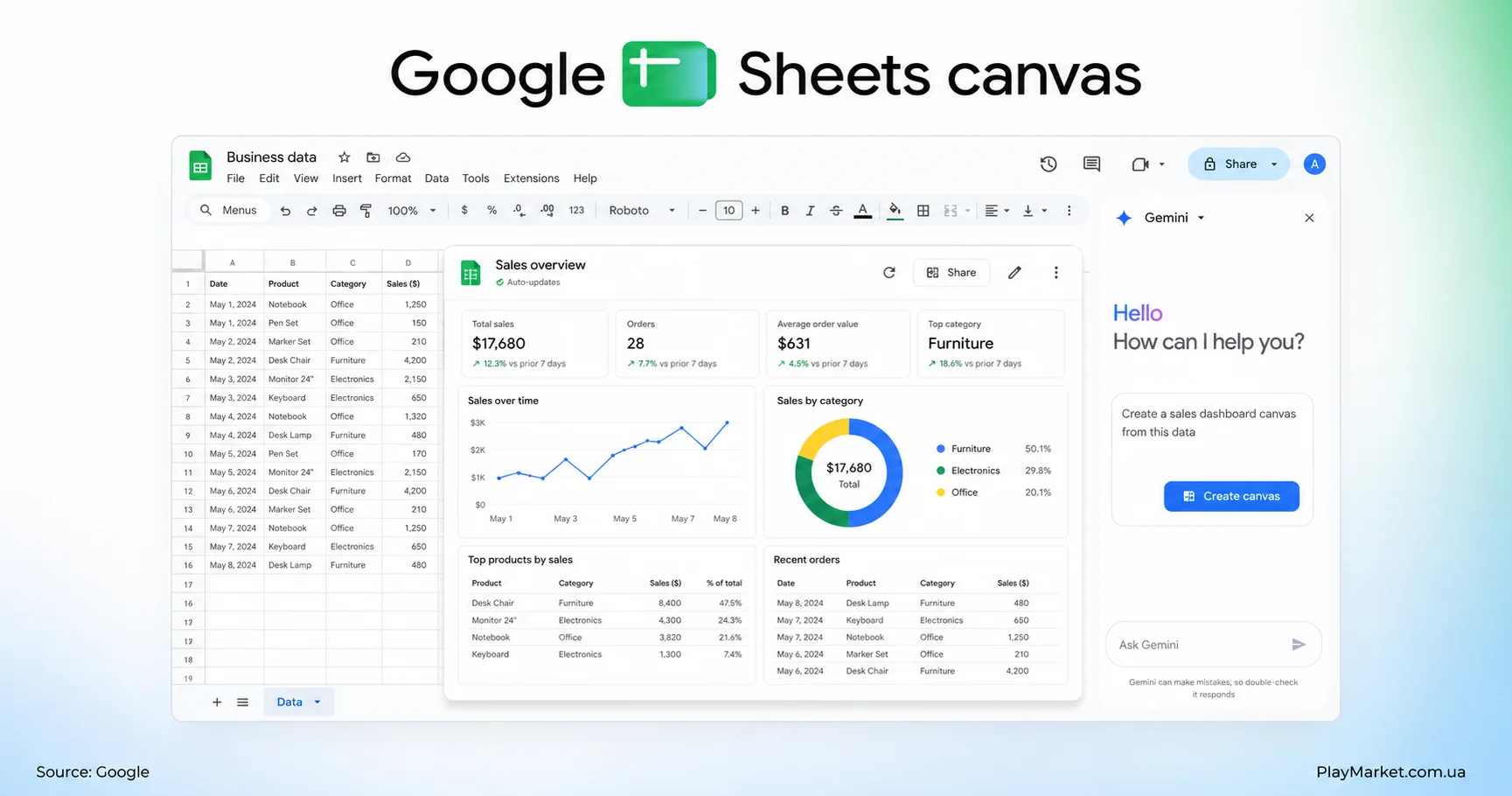
Google has introduced Sheets Canvas, a Gemini-powered feature that transforms traditional rows and columns into more convenient interactive interfaces. Users can describe what they want in natural language, and AI can build a tracker, dashboard, planner or another visual tool around their spreadsheet data.
Creating a Canvas does not require programming skills, advanced formulas or manual interface design.
What is Sheets Canvas?
Sheets Canvas is a visual, read-and-write layer built on top of data stored in Google Sheets. Instead of working only with the familiar spreadsheet grid, users can interact with cards, controls, filters, status indicators and other visual elements.
A list of assignments, for example, can become an interactive study tracker. A spreadsheet containing income and expenses can be displayed as a personal finance dashboard.
Canvas is not a separate application that needs to be installed. It remains part of Google Sheets and continues to use the original spreadsheet as its data source.
How to create a Canvas in Google Sheets
To get started, users open a spreadsheet, select the Gemini icon and choose the option to create a Canvas. They can then describe the interface they need.
Example prompts include:
“Create a study tracker with subjects, deadlines and completion status”;
“Turn this expense sheet into a monthly finance dashboard”;
“Create an interactive seating plan that lets me move guests between tables”;
“Display sales in a dashboard with filters for months and product categories.”
Gemini analyzes the structure of the spreadsheet and produces an initial version. Users can continue refining it through conversational requests, such as adding a field, changing the colors, rearranging the layout or creating another filter.
Canvas and spreadsheet data stay in sync
A major advantage of Sheets Canvas is that it does not create a disconnected copy of the information. The visual interface and the underlying spreadsheet remain linked.
Changing a task status, amount or other value in Canvas updates the corresponding spreadsheet data. Edits made directly in Google Sheets are also reflected in the Canvas.
This two-way synchronization means the feature can be used both to view information and to edit it through a more accessible interface.
What can users build with Sheets Canvas?
Google has demonstrated study trackers, seating charts and interactive dashboards, but the feature can potentially support many everyday and business tasks.
Possible uses include:
managing a personal budget;
planning a trip or event;
tracking customer orders;
recording fitness progress;
managing a small project;
creating a content calendar;
comparing products or services.
The quality of the result will depend on the information available in the spreadsheet and the clarity of the user’s instructions.
Can Sheets Canvas replace dedicated apps?
Sheets Canvas is not a complete software development platform. It is unlikely to replace professional CRM systems, accounting software or complex business applications.
Its strength is speed. A user can turn an existing spreadsheet into a simple internal tool without manually building formulas and dashboards or hiring a developer for a basic interface.
Availability may depend on the Google account, subscription and rollout stage. Users who do not yet see the Canvas option in the Gemini menu may need to wait until the feature reaches their account.
Source: Google’s official blog.