- PlatformsWindows
- Age3+
- CategoryEducation
- PriceFree
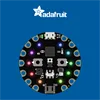
MakeCode for Adafruit is a Windows education app for learning programming and electronics through creative experiments with the Adafruit Circuit Playground Express. It is suited to learners who have a Windows computer and this board and want to explore how code can interact with electronic components and sensors.
What you can explore
Use the app to create activities that blink LEDs or make sounds, and experiment with the Circuit Playground Express sensors for touch, light, temperature and sound. For example, you can explore how a project responds to a change in light or touch while learning about programming and engineering.
The confirmed activities are centred on the Circuit Playground Express. The app description does not specify other supported boards or particular lessons and project templates.
Requirements and installation
You need a Windows computer and an Adafruit Circuit Playground Express to use the app as described. Installation is free.
- Select Download on this page to open the app’s Microsoft Store listing.
- Check that the listing names MakeCode for Adafruit and Adafruit Industries as the developer.
- Select the Store’s install button to install the app on Windows.