- PlatformsWindows
- Age3+
- CategoryEducation
- PriceFree
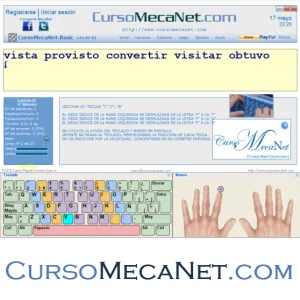
1890CursoMecaNet.CursoMecaNet.Collection is an English-language typing course for Windows. It is designed for learners who want to practise typing with ten fingers without looking at the keyboard, including children learning keyboard skills. The course is free to install and combines lessons, tests, progress tools and typing games.
Lessons and practical exercises
The course has 20 lessons with corresponding examinations. On-screen keyboard and hand guides show finger positions and movements as you practise. You can also use your own text files in TXT or DOC format for lessons and examinations, which lets you work with material you choose rather than only the course texts.
During practice, the app displays real-time information such as typing speed, words per minute, error percentage and notices. You can save and load separate user profiles to keep each learner’s lesson progress distinct. Lesson results can also be saved as web pages for online publication.
Settings and additional practice
Settings let you choose whether to allow key corrections that erase mistakes, switch key and error sounds on or off, and change the typeface and text size. A case-sensitivity option can distinguish uppercase from lowercase letters or treat them without that distinction, a useful choice for younger learners.
Alongside keyboard practice, the course is intended to support reading and spelling practice, attention, concentration, self-control and hand coordination. These exercises are for practice; the course does not guarantee a particular typing speed.
Games and included editions
The collection includes the typing games Letters Rain, Letter Navigator and Slippery Letter. It also contains MecaTest for timed examinations and a lesson generator. The bundled course editions and tools include versions with and without an application-selection menu, Basic, Core, Personal-Trainer, Classic, T2.0, 3.0, 3.1, 3.3, 3.7 and 3.8, as well as Infantile and Keyboard editions.
Install through Microsoft Store
This listing is for Windows, and the age rating provided is 3. To install the app, select Download on this page. On the Microsoft Store page that opens, check that the app name is 1890CursoMecaNet.CursoMecaNet.Collection and the developer is CursoMecaNet, then select the store’s install button.