- PlatformsWindows
- Age3+
- CategoryCard & Board
- PriceFree
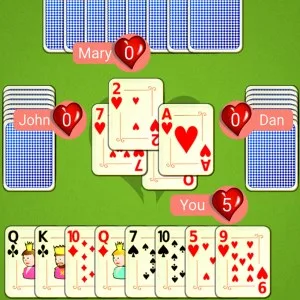
Hearts Mobile is a Windows card game for anyone who enjoys planning tricks and managing risk. Play at a four-player table against AI opponents: avoid cards that add points to your score, or try to collect them all with a Shoot the Moon play.
How a game of Hearts works
Each player receives 13 cards. Before a hand, everyone chooses three cards to pass to another player; no cards are passed on every fourth hand. The player holding the 2 of Clubs leads the first trick. After that, players must follow the suit led if they can. If you do not have a card of that suit, you may play any card. The highest card in the suit that began the trick wins it. Hearts cannot lead a trick until a heart has been played in a previous trick, which is known as breaking hearts.
Choose your scoring strategy
Each heart is worth one point, and the Queen of Spades is worth 13. To keep your score low, try to avoid taking these cards. Alternatively, collect all the scoring cards to Shoot the Moon: normally, your score stays unchanged while each opponent receives 26 points. If adding those points would take the other players over 100 while you would still lose, the alternative rule subtracts 26 from your score and leaves their scores unchanged.
The game ends when a player reaches or exceeds 100 points. The player with the lowest score wins, so a high-value trick can be either a setback or part of a deliberate strategy.
AI difficulty and game controls
Choose from Easy, Medium, or Hard. Easy is the default setting. To change difficulty, open the main menu with the button in the top-left corner; this also pauses the game. The selected level affects the AI's play from the next hand. The difficulty setting cycles from Easy to Medium to Hard and back to Easy.
Install Hearts Mobile on Windows
The game is free to install. Select Download on this page to open its Microsoft Store listing. Check that the listing shows Hearts Mobile and G Soft Team, then select the store's install button.