
Google is introducing new Android developer verification requirements that will change how some APK files are installed outside Google Play. If an app is not registered to a verified developer, the user will need to enable a special advanced flow, restart the phone and complete a 24-hour security delay.
The first regional enforcement begins on September 30, 2026, in Brazil, Indonesia, Singapore and Thailand. Google plans to expand the requirements globally across certified Android devices in 2027.
This does not mean that Android is banning APK files, third-party app stores or direct downloads from developer websites.
What is actually changing?
The new requirement focuses on the developer’s identity rather than the source from which an APK is downloaded.
A developer can continue distributing an application through Google Play, an independent store or a website. If the developer has verified their identity and registered the app’s package name and signing key, users should not experience a significant change.
The additional restrictions apply to unregistered apps from unverified developers. Installing one of these apps will require Android’s advanced flow.
Users will still be able to download an APK immediately. The new checks affect installation and updates, not the file download itself.
Where and when will the rules apply?
Starting September 30, 2026, enforcement will apply to certified phones and tablets running Android 7 or later in:
Brazil;
Indonesia;
Singapore;
Thailand.
The initial phase covers installations from Google Play, HONOR App Market, OPPO App Market, Samsung Galaxy Store, Palm Store, vivo V-Appstore and Xiaomi GetApps.
Google plans to expand developer verification globally to all apps on certified Android devices during 2027. A country-by-country schedule has not yet been published.
How to install an app from an unverified developer
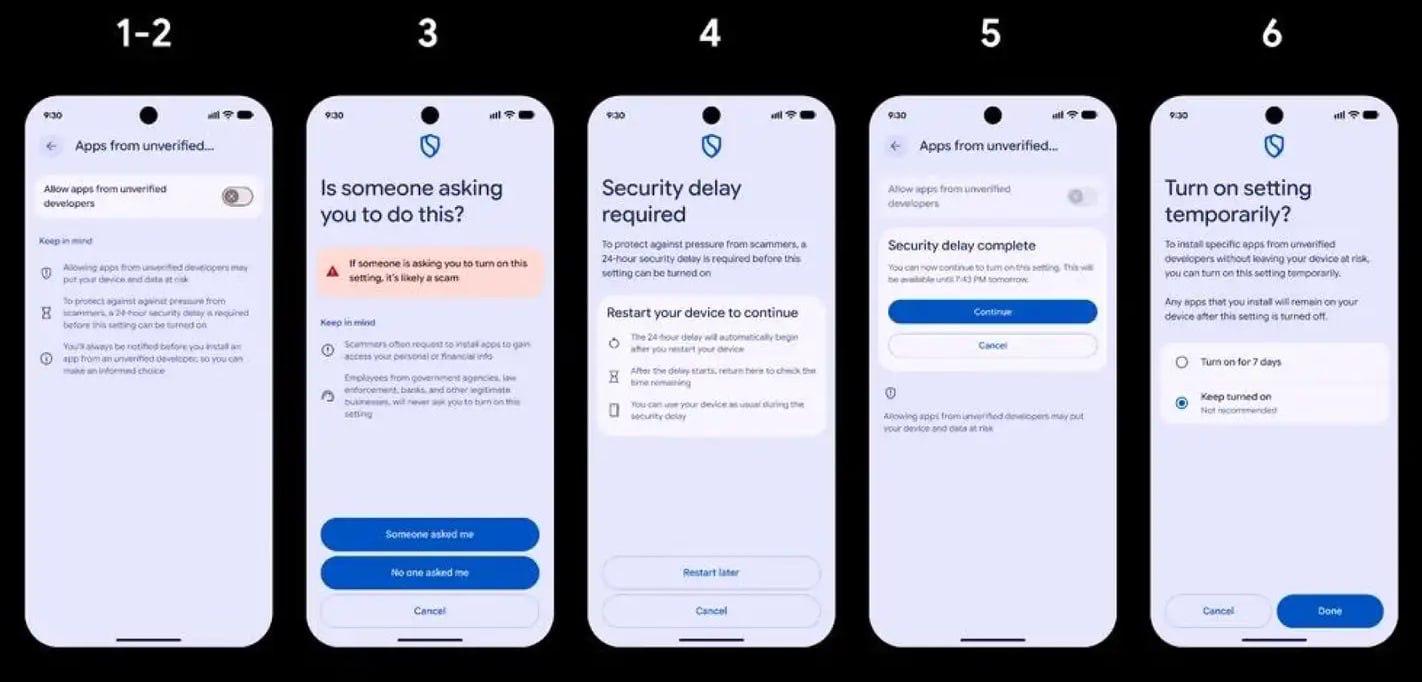
Menu names may vary depending on the phone manufacturer and Android version.
Enable Android developer options using the instructions provided by your device manufacturer.
Open Settings.
Select System and then Developer options.
Turn on “Allow apps from unverified developers.”
Confirm that nobody is coaching or pressuring you to disable security protections.
Restart the phone and unlock it again.
Wait for the 24-hour security period to end.
Return to the setting and authenticate with your PIN, fingerprint or face unlock.
Choose whether to enable the advanced flow for seven days or indefinitely.
Open the APK and select “Install anyway” after reviewing the warning.
The 24-hour delay applies to the one-time setup of the advanced flow. It is not repeated before every APK installation. Developer options do not need to remain enabled after the setup is completed.
Installations using Android Debug Bridge will continue to work as before and are not subject to the waiting period. ADB is primarily intended for developers and experienced users.
Why is Google introducing a 24-hour delay?
Google says the delay is designed to stop coercion and social-engineering scams. A fraudster may pose as a bank employee, delivery service or technical-support agent and instruct the victim to immediately install a malicious application.
Restarting the device interrupts an active phone call or remote-access session. The waiting period removes the false urgency created by the scammer and gives the victim time to verify the request independently.
Advantages of developer verification
Malicious developers will find it harder to distribute harmful apps anonymously.
Users are less likely to install malware while being coached during a scam call.
The waiting period provides time to verify the source.
Independent app stores and direct APK distribution remain available.
Power users retain the ability to install unregistered software.
Students and hobbyists can use a free limited-distribution account to share apps with up to 20 devices without submitting government identification.
Disadvantages and concerns
The first installation of an unregistered app can be delayed by 24 hours.
The setup may be confusing for less experienced users.
Independent and anonymous developers face additional distribution barriers.
Updates to an unregistered app may fail when the advanced flow is disabled.
The system gives Google more control over software installed on certified Android devices.
A verified identity does not guarantee that an application is safe or high quality.
Developer verification mainly connects an app with an accountable person or organization. It is not a complete security review of the app’s code or functionality.
Risks of installing APKs from unofficial sources
An APK downloaded from an unknown website, message or email may have been modified after leaving the original developer. Attackers can add malware, intrusive advertising, hidden subscriptions or tools that steal personal information.
Possible risks include:
stolen passwords and banking credentials;
interception of SMS messages and verification codes;
access to contacts, documents, photos and location;
screen recording or microphone access;
fake overlays placed above banking apps;
unwanted paid subscriptions;
missing security updates;
installation of counterfeit or modified software.
Google reports that Play Protect identified more than 27 million new malicious apps from outside Google Play in 2025.
How to install APK files more safely
Download the APK from the developer’s official website or a reputable app store. Avoid cracked, modified and “free premium” versions.
Keep Google Play Protect enabled and allow it to scan unknown applications. Review the app’s permissions after installation. Be particularly cautious about requests for access to SMS, Accessibility services, notifications, device administration, the microphone or screen content.
Never install an APK while speaking to someone who claims to represent a bank, delivery company, police department or technical-support service. Contact the organization independently through its verified website or phone number.
If the developer publishes an SHA-256 checksum or signing information, compare it with the downloaded file before installing it.
Android will remain open to software distributed beyond Google Play, but bypassing its default protections will become a more deliberate decision. For most users, the change provides another layer of security. For experienced users, it introduces a one-time process before they can continue installing apps from unverified developers.
Sources: Android developer verification, advanced flow announcement, Android Help instructions, official FAQ, and Google’s Android security report.